remotes::install_github("Cal-Poly-Advanced-R/nhldashboard")
nhldashboard::launch_dashboard()Practice Exam: Unit 2
Part One: Sketch a Dashboard
Click here to see a text file with source code for a Quarto dashboard. For now, ignore the blanks in the code and pay attention only to the dashboard layout.
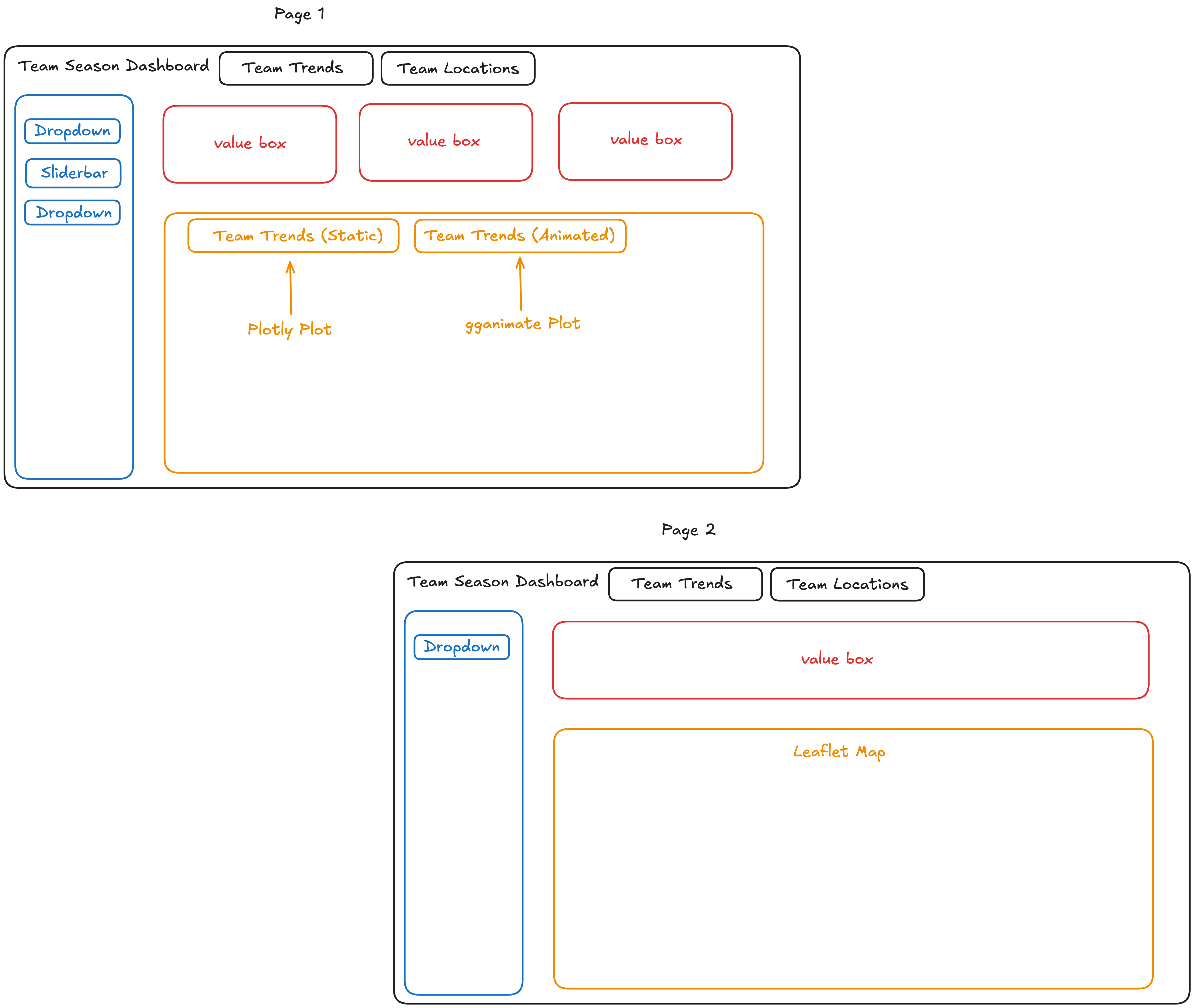
Draw a outline of the structure of the dashboard. Your sketch should make it clear what content would go where (e.g., rows, columns, navigation bar, tabsets, pages). You do not need to create sketches of the content (e.g., plots, tables, output values). However, if a card includes a title, you do need to include the name in your sketch.
Note
This section of the practice exam is identical in structure to what you will see on the actual exam. We recommend printing the text file and then trying to sketch the dashboard, without your computer open, so that you are practicing in the same format as the exam.
So you understand what type of sketch we are looking for, here is an example of a complete sketch of the structure of the dashboard.
DO NOT MOVE ON TO PART 2 UNTIL YOU ARE COMPLETELY FINISHED WITH PART ONE
Part Two: Fill in Blanks
Now, you can run the following code to see the actual dashboard:
Use the information of what you can see on the dashboard to fill in the 24 blank sections of the source code.
To best use this for exam practice…
DO:
Use the one-page hand-written notesheet that you plan to bring to the exam.
Use your computer to reference official package “cheatsheets” or function lists - you are not expected to memorize exact function names.
Interact with the dashboard as much as you want to see all the elements and functionality it has!
DO NOT:
Actually try running your code, until you are completely done with your best attempt at all blanks. On the exam, you won’t have the ability to test your answers in this way!
Use GenAI or Google to help you figure out the blanks. Of course, you won’t have this option on the exam.
Look at the raw html of the dashboard. This probably won’t help you anyways.
Note
This section of the practice exam is a bit different to what you will see on the actual exam. Instead of getting a complete source code full of blanks, you will get source code for a basic dashboard and be asked questions about the code needed to upgrade it.
However, the types of code you will be asked about is similar to this practice exam; if you feel confident filling in these blanks, you will be well-prepared.
On the exam, you will also be given a “bank” of possible code bits to choose from for any fill-in-the-blank questions. This means that you don’t have to memorize any exact functions - but you do need to be able to choose between possibly similar pieces of code, such as Team versus team or tabset vs card.
Other Exam Details
You may bring one double-sided notesheet, handwritten content only. (Content that is handwritten onto a tablet and then printed is acceptable, as long as it is kept at reasonable human handwriting size, and no non-handwritten elements are present.)
This is exam is not strictly cumulative, in the sense that questions are targeted at testing Unit 2 content only. Of course, many of the code elements present require knowledge from Unit 1 to understand the whole process.